

Cleaning corrupt CAD models: 5-Axis Machining
Job shops commonly receive corrupted or "dirty" CAD files from their customers. These files must be cleaned or repaired before toolpaths for machining the workpiece can be created. Software solutions like SpaceClaim, developed by ANSYS Inc., can fix dirty models, with the end goal of creating "watertight" solids ready for machining.
Job shops commonly receive corrupted or “dirty” CAD files from their customers. These files must be cleaned or repaired before toolpaths for machining the workpiece can be created. Software solutions like SpaceClaim, developed by ANSYS Inc., can fix dirty models, with the end goal of creating “watertight” solids ready for machining.
“Anytime someone has to machine a part, typically they’re starting with a 3D file,” said John Graham, senior product marketing manager at ANSYS, Canonsburg, Pa. “As 5-axis machining has become more prevalent, the curvature of these surfaces can be very complex—hence the need for CAM software to develop toolpaths.”
The problem is that CAD and CAM don’t always speak the same language. When vendors or job shops open a file from a customer in their CAM program, the translation may not come through, introducing corruption in the model.
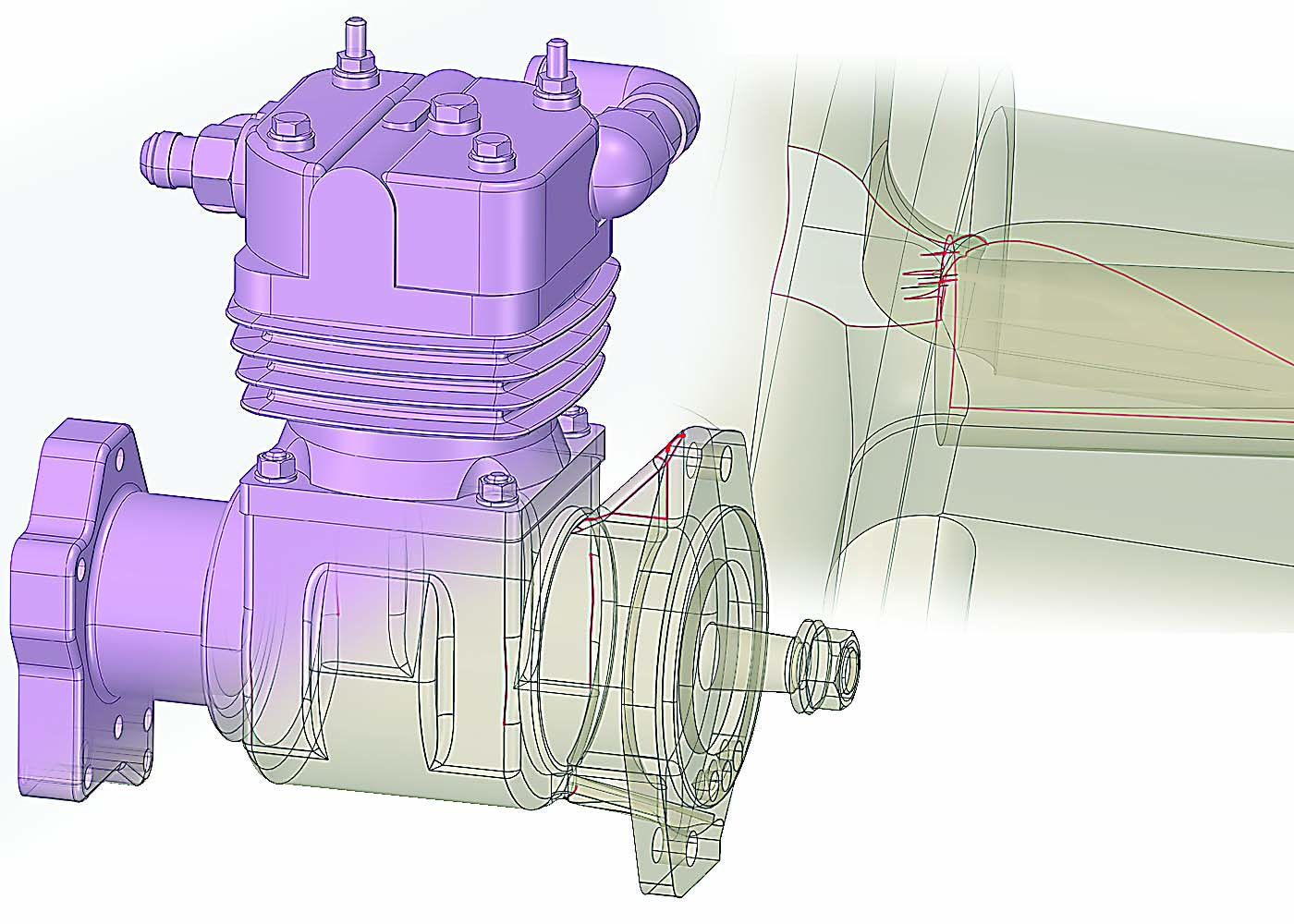
CAD model showing corrupted faces that must be cleaned before a toolpath can be created. Image courtesy of ANSYS.
“You may have two faces coming together with a sliver opening between them because the definition of the edge of one of those faces is off,” Graham said. He added that a face could be missing or corrupt. In those cases, the mathematics behind the scenes would be totally off target. “You don’t want your toolpath going off and cutting air.”
Many things can go wrong along the way. It’s important to identify and fix those problems. Once the collection of surfaces are clean and watertight, Graham said, the user can send that collection—also known as a solid—into a CAM
system and build a toolpath off it.
Using the automated repair tools on SpaceClaim, the first step is often to stitch faces together. “Two faces may look like they share a common edge because they are perfectly aligned,” Graham explained. “But because of the way they are defined, the system doesn’t know they actually share that edge and are connected.”
Review the print ads from this magazine to continue
This quick advertiser review unlocks the rest of the article and keeps the full-screen reader focused on the ads instead of the page chrome.
Advertisers included in this article experience
Print placements connected to this article
Yg1usa
BEST VALUE IN THE WORLD OF CUTTING TOOLS!
COATED SOLID CARBIDE END MILLS Coated Ultra Micro Grain Solid Carbide End Mills with Variable Helix High Volume Cutting with Quality Surface Finish For Steels (up to HRc40), and also Excellent in Stainless Steels YG-1 TOOL CO. 730 Corporate Woods Parkway Vernon Hills, IL 60061 U.S.A.
BEST VALUE IN THE WORLD OF CUTTING TOOLS! www.yg1usa.com COATED SOLID CARBIDE END MILLS Coated Ultra Micro Grain Solid Carbide End Mills with Variable Helix High Volume Cutting with Quality Surface Finish For Steels (up to HRc40), and also Excellent in Stainless Steels YG-1 TOOL CO. 730 Corporate Woods Parkway Vernon Hills, IL 60061 U.S.A PHONE: 800-765-8665, Technical Assistance: 888-868-5988
Visit Yg1usa View this placement in the issue recordPrint ads from this magazine
COATED SOLID CARBIDE END MILLS Coated Ultra Micro Grain Solid Carbide End Mills with Variable Helix High Volume Cutting with Quality Surface Finish For Steels (up to HRc40), and also Excellent in Stainless Steels YG-1 TOOL CO. 730 Corporate Woods Parkway Vernon Hills, IL 60061 U.S.A.
BEST VALUE IN THE WORLD OF CUTTING TOOLS! www.yg1usa.com COATED SOLID CARBIDE END MILLS Coated Ultra Micro Grain Solid Carbide End Mills with Variable Helix High Volume Cutting with Quality Surface Finish For Steels (up to HRc40), and also Excellent in Stainless Steels YG-1 TOOL CO. 730 Corporate Woods Parkway Vernon Hills, IL 60061 U.S.A PHONE: 800-765-8665, Technical Assistance: 888-868-5988
Continue reading
June 2017
If stitching the edges together doesn’t form a watertight collection, users move to the next tool, which looks for gaps where edges don’t quite meet and joins them together.
Still another tool checks for missing faces. If that is the problem, one option is to put a patch over it, essentially creating a brand-new surface, Graham said. “Or, you can take the nearby edges and extend their natural topology, shrinking the opening down as if it were never there.”
Even though these automated tools can take care of 90 percent of the problems, they aren’t foolproof, Graham noted. However, the software also lets users work manually, when needed, to get a cleaner, more accurate fix.
“The job of a machine shop is to cut parts and ship them out. If they have to take a couple of hours to clean up a CAD file, that’s money wasted,” Graham said.
Job shops are better off the more quickly they can complete their setup and start cutting. “The goal is not for people to become CAD experts, just to heal up your model fast and then go cut,” he said.
In addition to cleaning and repairing CAD files, SpaceClaim can be used to build 3D models of jigs and fixtures that accurately match the contour of a workpiece, according to Graham. They can also create process plans to capture the different stages of machining operations.
Related



 MFGAxis Discussion
Be part of the shop-floor conversation
Like, save, or comment on this CTE story.
MFGAxis Discussion
Be part of the shop-floor conversation
Like, save, or comment on this CTE story.


MFGAxis Discussion